Page Rendering
Architecture Reminder
P1 is a cloud-native website management platform built on Pantheon's core WebOps infrastructure. Understanding how the key layers interact is essential to understanding how page rendering works.
The P1 Client is a client library installed on the Next.js site that runs on the customer's hosting environment on Pantheon’s hosting platform. It handles all incoming page requests: resolving routes, versions, fetching content, applying templates, and returning rendered HTML. It is the rendering engine. P1 client also includes the visual editor which handles all page editing operations.
The Collaborative Content Repository (CCR) is the backend that stores and serves all structured content as documents. Each page, template, and redirect is stored as a CCR document. The P1 Client fetches from the CCR at request time or at build time depending on the rendering mode.
Pantheon Edge sits in front of the P1 Client, handling caching, redirect rules, and edge-level routing decisions — including serving cached responses and short-circuiting requests that match a redirect rule before they ever reach the P1 Client.
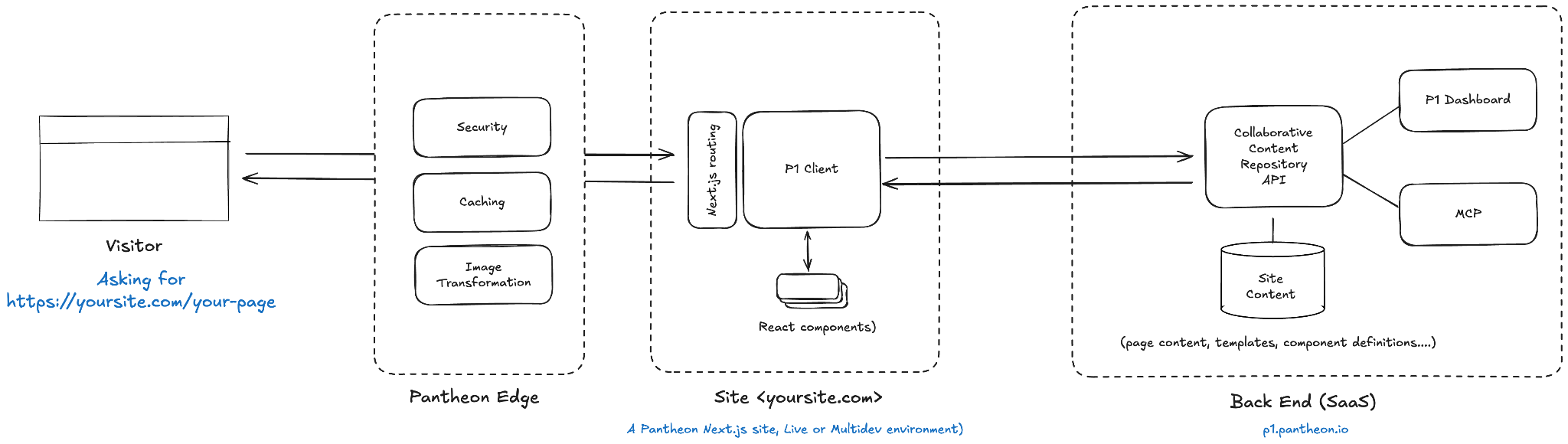
The full request lifecycle for a page is: incoming request → Pantheon Edge (powered by Cloudflare) (cache / redirect check) → P1 Client (route resolution + request to content repository) → component and page rendering → HTML response.
Static Page Rendering
Static page rendering is the baseline mode in P1.
Each page corresponds to a single CCR document, stored at a path derived from the site structure (slug + parent path). For instance, https://yoursite.com/my-page
matches a page ocument with the slug set at my-page in CCR. The relationship between URL and document is one-to-one.
When a visitor requests a URL, the P1 Client resolves it against the site's page hierarchy, fetches the matching CCR document, and renders the component tree as authored in the Visual Editor for each and every page separately.
The response can be cached at the Cloudflare Edge for subsequent requests, so repeated requests to a stable page do not hit the CCR.
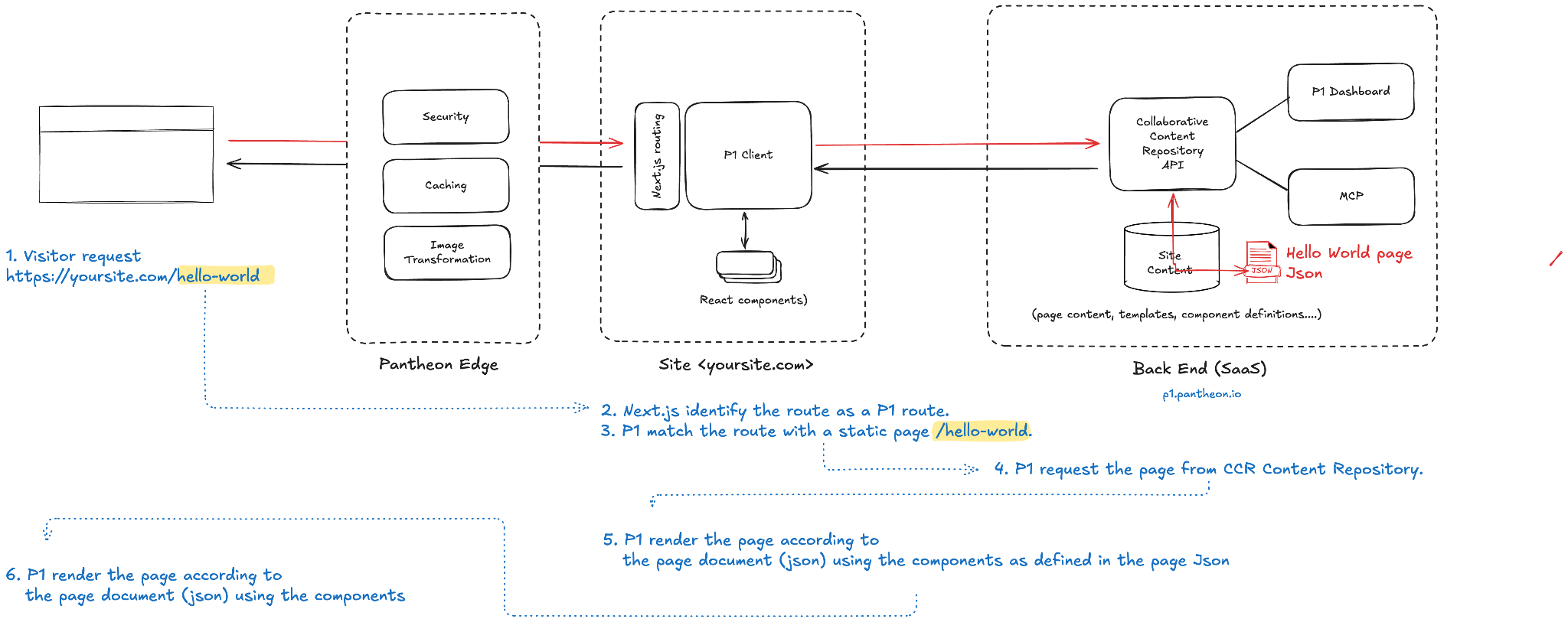
Static page rendering is not to be confused with static page management. The static part is the routing and the fact that each route is hitting its own page content, allowing for totally different layouts or page composition. Yet, pages are not static HTML documents and can embed highly interactive or personalized components.
Dynamic Page Rendering
Dynamic page rendering extends the static model by introducing parameterized routes — URL segments that act as variables rather than fixed slugs.
A single page template can power many URLs, with each URL resolved to a different data record at request time. This is typically used for rendering content that lives in an external data store, for example a remote headless e-Commerce solution for product information, an existing Headless CMS, a bespoke database application built in-house or Pantheon Content Publisher content integration service.
The administrator creating a dynamic page defines a dynamic route using colon notation in the page path, for example mysite.com/dynamicsection/:id. The P1 Client recognizes these segments as dynamic parameters. Instead of looking for a one-to-one document match, it invokes the dynamic data-fetching logic:
The route
/dynamicsection/my-data-idis matched against the dynamic route definition/dynamicsection/:slug.URL parameters (in our example
my-data-id, but there could be several) are extracted and passed to the page.The page fetches the relevant data record using those parameters using the configured external data sources and any custom code.
The component tree is rendered with the fetched data.
As defined above, dynamic page rendering assumes the route is not resolving a static page. If a static page exists on that same route, it will be resolved first, and the dynamic route will not be followed.
By design, dynamic page rendering implies each content will be rendered using the same page structure and design. This said, P1 offers an option to override each page layout and structure to possibly update a specific route, transforming partially (for the elements being overridden) in a document rendered statically.
This mode enables data-driven sites where hundreds or thousands of pages share a single template and rendering logic, with content differences driven entirely by URL parameters rather than individual authored documents.
Template System for Content and Page Types
P1's template system provides a reusable rendering contract that both static and dynamic page rendering can build on. Templates define the structural and visual rules for a class of pages; pages created from a template inherit those rules.
Templates are stored as CCR documents at _registry/templates/{name}. They are not exposed to a direct route, hence not visible to end users, but are managed and edited in the visual editor.
Each template is defined by a Content Type made of a name, a label, a description (very important for users and furthermore for agents to understand when and how to use the templates) and the TemplateSnapshot, a document very similar to a page made of page metadata and a component tree. The component tree includes pinned components. They are structural elements that site contributors cannot move, remove, or restructure when working on pages. They are locked to the template by administrators and define the non-negotiable layout of pages created from that template.
Editorial components (the other components) are elements that content editors can freely configure, replace, or populate within the guardrails set by the template. The distinction between pinned and editorial components is enforced by the visual editor's permissions API.
When a site manager creates a new page from a template — via the Visual Editor page creation flow (template selector step) or the site structure panel — the page document is initialized from the template's TemplateSnapshot. The document stores a template_id reference back to the originating template. Pinned components are locked on the resulting page; editorial zones are open to the editor.
When a template is updated, the system can propagate structural changes to all pages derived from it. This migration is workstream-scoped and queue-based, using structural action logs on document_versions (via action_type and action_metadata fields) to derive deltas and detect conflicts.
Custom page rendering logic
As by design, P1 is based on Next.js and uses Next.js routing system, developers are always able to define their own routes outside of P1. This is one of the values of P1 client architecture, offering maximum flexibility.
Either for the sake of integrating P1 in an existing Next.js website without having to migrate all content, or because some applications are not just content, but might require their own business logic better managed out of P1; there are plenty of reasons this might be needed and it is very simple to implement: simply created a dedicated route in your Next.js application for that purpose.
Page Redirects
Redirects in P1 are stored as their own record type in the CCR, alongside page documents. Each redirect has an origin path, a destination (a relative site URL or an absolute external URL), a type (permanent or temporary) with its HTTP status code, and a flag that says whether it also covers the routes under the origin.
Automatic redirects on slug or structure changes. When an editor or agent changes a page's slug, P1 asks whether to redirect the old URL to the new one. When a parent section's slug changes (for example /news renamed to /articles), one rule at the root of the change covers every child URL, so /news/* redirects to /articles/*, rather than one redirect per page.
Viewing and deleting redirects. A site's redirects are listed under Site structure → Redirects in the dashboard, where each one can be deleted. See Page redirects for the editor's view.
How a redirect is served. The P1 Client applies redirects in your Next.js middleware: createP1Middleware from @pantheon-systems/p1-next-sdk/server, which the starter kit sets up in middleware.ts (proxy.ts on Next.js 16). For each request it looks the path up in P1 and, if a redirect matches, responds with its status code (301, 302, 303, 307 or 308; 301 if none is set), carrying over any query parameters the destination does not already have. It skips /p1/, /_next/ and /api/. If the lookup fails, the request carries on to the page rather than erroring.
Redirects from URLs that were never P1 pages. P1 creates redirects from slug and section changes only. To redirect a URL P1 has no page history for, such as a page from a previous site or an old campaign link, add it to your Next.js app's redirects() in next.config.js, which Next.js applies before the middleware runs.